
Counting Birds From a Mountain Hut Over Satellite

TLDR
- When an IoT device is in a truly remote location, combining edge AI and satellite communication can be a great solution.
- Connecting to a satellite is easier and simpler than you may think.
- Processing images on the device and sending only small, infrequent updates can keep satellite communication costs low.
Picture a mountain hut above the treeline. It has a solar panel and a battery, but no cellular coverage. A research team wants to know how many birds visit the site and how that changes over the season.
To do so, they deploy a camera trap, an automated camera that captures images when heat or motion sensors are triggered. Because it records locally, data retrieval can be as frequent or infrequent as the research team desires i.e. someone can simply hike up once a year, retrieve the data, and the team gets twelve months of images in one go, should they desire. The downside to this schedule is that, if the battery died 2 months after installation or the camera got knocked out of angle halfway through, nobody finds out until the next visit later in the year.
Whatever the schedule, the images are still worth the hike – they are the data the project is built upon, after all. Even if the bird count itself is tiny, monitoring the population levels, movements, and behaviors can reveal trends – within the timing context, at least. More frequent data dumps can allow the team to see trends as they happen and learn about a failed site before a year has passed. Essentially, the more often counts come in, the better the monitoring.
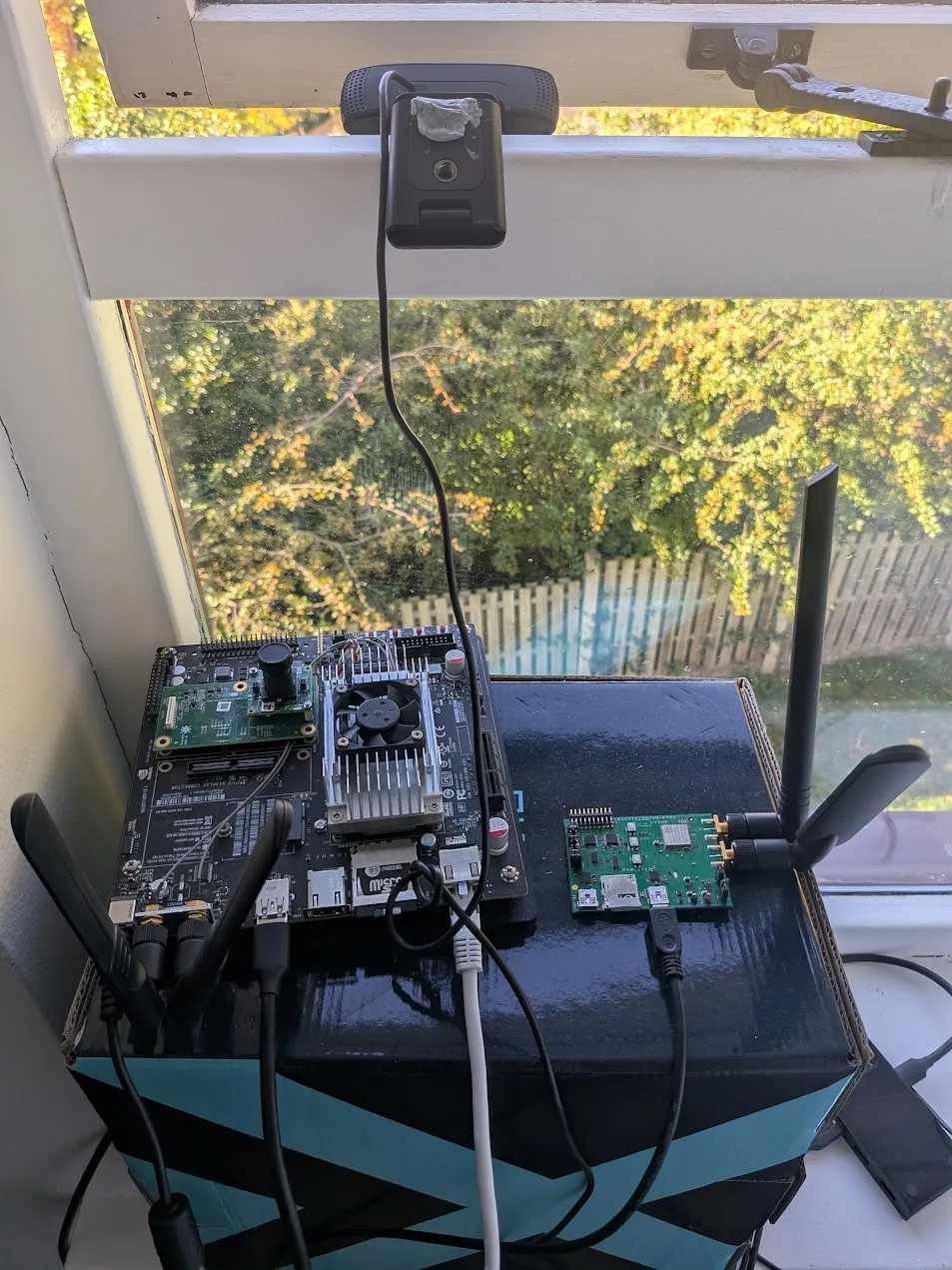
This post walks through a prototype of that setup. An NVIDIA Jetson TX1 and a webcam that counts birds on the device, and a Murata Type 1SC-NTN EVK that sends the count over Skylo’s satellite network using Soracom Air for Satellite (planNT1).
Why Process Images at the Edge?
Of course, since we are using satellite for this project, bandwidth is a major constraint:
- planNT1 data is billed at $0.80/KiB (1 KiB = 1,024 bytes), the same rate in every country with planNT1 satellite coverage.
- The maximum UDP payload over satellite is 1,200 bytes.
One compressed photo is tens of KiB, so sending a single image would cost tens of dollars. The images, therefore, stay on the device, and only the result (how many birds and how confident the model is that each detection is really a bird, as a score from 0 to 1) goes over the link. This means the payload is only 8 bytes. When combined with the packet headers (about 80 bytes per packet, as measured on this SIM) and the short reply that confirms delivery, each report comes to around 170 bytes, or about $0.13, meaning a daily report would cost about $4 a month.
That gives the system two channels, which run in parallel: the satellite link reports the bird count every day, and a person still visits once a year to collect the images:
| Channel | Data sent | Frequency |
| Satellite | Bird counts | Every day (or more often if needed) |
| A person with a backpack | Images from local storage | Once a year, to cross-check the counts and retrain the model |
How it Works
Soracom services used:
- Soracom Air for Satellite (planNT1)
- Soracom Unified Endpoint
- Soracom Orbit
- Soracom Harvest Data

Connecting the Jetson to the Murata 1SC
The EVK and the webcam both plug into a USB hub on the Jetson. The EVK’s USB interface is a Silicon Labs CP210x USB-to-UART bridge, so the Jetson sees an ordinary serial port.
The serial line is the only connection between the two boards. There is no modem driver, no PPP, and no network interface on the Jetson side. The 1SC runs its own IP stack and owns the satellite connection. The Jetson’s whole job on the network side is to write AT commands and read the replies. The Jetson’s own Ethernet and Wi-Fi are used for setup, a local status dashboard, and an RTSP stream, and none of that traffic goes over the satellite link. Nothing on the modem side is Jetson-specific, so any Linux board with a USB port could do the same. Only the bird detection depends on the Jetson.
When the EVK is plugged in, the cp210x driver that ships with the Jetson’s Linux kernel picks it up and creates /dev/ttyUSB0. Always add your user to the dialout group, so you don’t need root to open the port: sudo usermod -aG dialout $USER
Before writing any code, try it by hand. Open a terminal program, type AT, and you should get OK back: minicom -D /dev/ttyUSB0 -b 115200. Note that minicom is very useful in general for sending AT commands to debug/set up modems.
In code, it’s the same thing: write a line ending in \r\n, then read until the modem says OK or ERROR. This uses Python and pyserial (sudo apt install python3-serial):
import time
import serial

# pyserial defaults to 8 data bits, no parity, 1 stop bit, so only the baud rate is needed
ser = serial.Serial("/dev/ttyUSB0", 115200, timeout=1)

def at(cmd, wait=5.0):
   """Send one AT command and wait for the modem to finish answering."""
   ser.reset_input_buffer()
   ser.write((cmd + "\r\n").encode())
   deadline = time.time() + wait
   buf = b""
   while time.time() < deadline:
       buf += ser.read(ser.in_waiting or 1)
       if b"OK" in buf or b"ERROR" in buf:
           break
   return buf.decode("ascii", errors="replace")

print(at("AT"))  # -> AT\r\n\r\nOKCode language: PHP (php)
Every command in this post goes through that one function. It waits for each reply before returning because the 1SC drops any command that arrives before it has answered the last one. To send a report (once the modem is set up, see below), the Jetson converts the packed payload to a hex string and puts it inside the AT command:
payload = bytes.fromhex("0100FE016ABBA19D")  # the 8-byte bird report
at('AT%SOCKETDATA="SEND",1,{},"{}"'.format(len(payload), payload.hex().upper()), wait=60)Code language: PHP (php)
One-time modem setup, following Soracom’s Murata 1SC guide:
AT+CSIM=52,"80C2000015D613190103820282811B0100130799F08900010001" # switch the SIM to planNT1 (never selected automatically)
AT+CIMI # IMSI should now start with 29510
AT+CFUN=0 # radio off
AT%PDNSET=1,"soracom.io","IP" # APN
AT%RATIMGSEL=2 # NB-IoT NTN firmware image
AT%RATACT="NBNTN",1 # activate NB-IoT NTN
AT%SETCFG="BAND","255" # 255 = UK/Oceania/Brazil, 256 = EU, 23 = US/CA
AT%NTNCFG="pos","stat","<lat>","<lon>","<alt>" # fixed site, so a static position is fine
AT+CFUN=1 # radio on
AT+CEREG=2 # registration URCsCode language: PHP (php)
A hut doesn’t move, so a static position is a good fit here. A moving device would use the 1SC’s internal GNSS instead.
Sending a report:
AT%SOCKETCMD="ALLOCATE",1,"UDP","OPEN","100.127.69.42",23080,0
AT%SOCKETCMD="ACTIVATE",1
AT%SOCKETDATA="SEND",1,8,"0100FE016ABBA19D"Code language: JavaScript (javascript)
That is socket 1, eight bytes, with the payload as a hex string. The socket points to Unified Endpoint’s IP address rather than unified.soracom.io because DNS lookups often fail due to satellite latency. The address can change, so check unified.soracom.io from a device on the Soracom network before deploying. Unified Endpoint replies, the modem raises %SOCKETEV:1,1, and AT%SOCKETDATA="RECEIVE",1,50 returns "323031", which is ASCII 201: Harvest Data stored the record.
Eight Bytes
A report is eight bytes, because satellite data is priced at $0.80/KiB. A single sighting and the daily summary use the same layout, big-endian:
| Byte | Field |
| 0 | Schema version (1 = one sighting, 2 = daily summary) |
| 1 | Species ID (0 = “bird”) |
| 2 | Confidence x 255 (daily summary: average for the day) |
| 3 | Number of birds (daily summary: total for the day) |
| 4-7 | Unix timestamp from the device |
In daily mode, the Jetson sends its summary at midnight UTC, even when the count is zero. A zero means the site is working and nothing came past. No report at all means something is wrong, and someone should go and look.
The device never sends JSON. Decoding happens on the platform instead: a small Orbit soralet, written in AssemblyScript and compiled to WebAssembly, runs on every packet that reaches the Unified Endpoint and turns those eight bytes into JSON before Harvest Data stores it. For a day with 23 birds, 0200CE176AC82E80 becomes:
{"event":"period_summary","species":"bird","species_id":0,
 "confidence_pct":80,"count":23,"device_ts":1791504000}Code language: JSON / JSON with Comments (json)
That split is the point of Orbit for satellite work. Soracom Orbit runs a small program that you write, called a soralet, inside the Soracom platform. It transforms each message as it passes between the device and the cloud, so the device can send compact binary while services such as Harvest Data receive readable JSON. The expensive link carries the smallest possible message, and the readable version is produced on the Soracom side, where bytes are free.
What it Costs*
For one hut reporting once a day:
- planNT1 delivery: $3.00, one-time
- planNT1 basic fee: $1.80 a month (it replaces the plan01s basic fee)
- Satellite data: about 170 bytes per report with headers and the reply, so about 5 KiB, or $4 a month
- Orbit and Harvest Data: free for a single device
That is about $6 a month to hear from the hut every day.
*As of October 2026. Check the pricing page for your region before planning a deployment.

Conclusion
Satellite changes how you design more than what you build. Every byte over the link costs money, so the device sends only the data the application needs. It counts birds locally, sends eight bytes over UDP once a day, and keeps the photos until someone hikes up to collect them.
That is the takeaway for anyone building on NTN. Keep the device dumb about the network and strict about what it sends, and let the platform do the rest. Designing with the data in mind from the start (i.e. what is worth sending, and how small it can be) is what keeps a satellite project cost-conscious.
Got a question about Soracom Air for Satellite? Contact us to see how it could connect your own remote sites.


MORE LIKE THIS




What is Soracom?
Discover why technology innovators choose Soracom for connecting their
devices to the cloud over cellular.

Soracom's Picks
Advices and interviews, to inform and inspire.


Ask Your Fleet a Question: Soracom Query Now Includes 500 Free Queries for Every Account
TL;DR Most organizations running connected devices are sitting on more…

What “Low Power” Actually Means: A Reality Check on Battery Life Expectations in the World of LTE-M and NB-IoT
TL;DR The Number on the Datasheet It usually starts with…

SMS in IoT: What is Changing, and What We are Doing About It
TL:DR Working in Telco, you hear the same story every…


Cloud Native
IoT Connectivity Platform
Soracom built the worlds first cloud-native connectivity management platform, built on AWS. Learn more about going beyond connectivity.